


 MMANA or 4NEC2 users will find this calculator useful. It allows for quick recalculation of optimized antenna dimensions obtained from the model, taking into account boom correction using the DL2KQ formulas. Element lengths can be manually entered, with each value on a new line. You can also select and then load a *.maa or *.nec file; the script will do this automatically. This assumes a simplified model with a linear dipole. The script checks for compliance with this constraint, and inappropriate models will not be loaded. In the results, elements are numbered as they are numbered in the MMANA wire table, and for the NEC file, according to the tag values in the GW cards. Arrays of corrected data are also output, which may be useful for other modelers. The results of recalculating MMANA or 4NEC2 models can be saved as a VBScript for loading and automatically creating a 3D antenna model in ANSYS HFSS.
Javascript source code:
Copyright ©2025- 3G-Aerial
Limitations and features of antenna calculations
This calculator uses DL2KQ formulas for calculating boom correction. Based on measurements of a large number of practical designs, DL6WU derived an empirical formula for calculating the element length correction taking into account the influence of the boom. G3SEK transformed this formula into a more readable form, which is why it is known as the G3SEK formula. This formula is valid only if the boom diameter is less than 5...5.5% of the wavelength. However, at frequencies above 1000 MHz, thicker booms are usually used. Therefore, a formula was needed for boom thicknesses up to 8...9% of the wavelength. This formula was derived by DL2KQ based on measurements of a large number of practical antennas. In addition, DL2KQ derived a boom correction formula for a boom with a square cross-section. The formulas used by the calculator are marked in blue.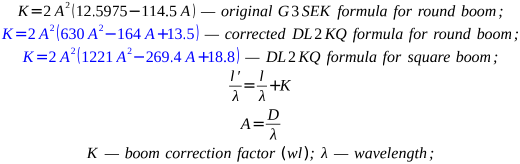 The following image explains the notations in the formulas:
 All K values obtained from the formulas are valid for Option 1: mounting elements above a metal boom (see below). The following restrictions apply, failure to comply with which affects the accuracy of the correction calculation:
- The boom diameter must be significantly (at least twice) larger than the element diameter;
- The distances from the ends of the boom to the reflector and to the last director are not zero, but at least three times the element diameter;
What is boom correction? With a metal boom, the antenna elements become locally thicker at the mounting location on the boom. This leads to a decrease in the inductance by unit length at this location, which is equivalent to shortening the element. To reestablish its electrical length, the element must be physically lengthened. This is called boom correction. Wire antenna modeling programs based on the NEC core, such as MMANA, cannot directly take this correction into account, which is one of the challenges in Uda-Yagi antenna design. It is necessary to resort to empirical methods and formulas for boom correction calculations, based on large arrays of practical measurements of real antennas.
There are four different cases of mounting elements on the antenna boom, in which its influence must be taken into account to one degree or another:
- The elements pass through the center of the metal boom and have galvanic contact with it. (Option 1). Basic option, which is calculated by the formulas above.

- The elements are mounted above the boom and have contact with it. (Option 2).
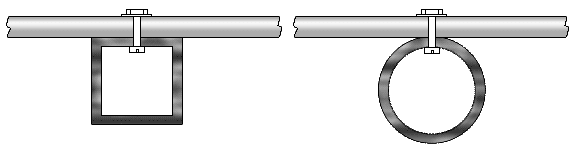
- The elements pass through the center of the metal boom and are insulated from it. (Option 3).

- The elements are mounted on the boom from above and are insulated from it. (Option 4).
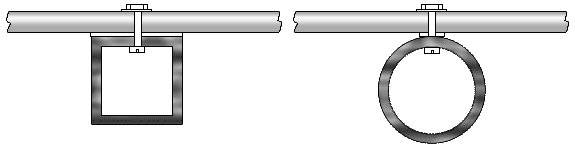
Obviously, in the second, third, and fourth installation options, the boom correction value will be less than in the first option. This is taken into account by the following expression K' = corr * K, where corr is the value characterizing the degree of reduction (a fraction of unity) of the boom correction compared to the basic first installation option.
- In the second option, corr≈0.55…0.7, depending on the contact width of the element and the crossbar. In our calculator, for a round cross-section boom, corr=0.55 is assumed, for a square cross-section, corr=0.7.
- In the third and fourth options, corr≈0.5 and depends on the capacitance between the boom and the element at the insulation location. Our calculator uses the value corr=0.5.
If the boom is dielectric, then when installing elements passing through it, the length of the elements must be shortened, not lengthened. The magnitude of this correction depends on the ratio of the boom diameter to the diameter and length of the elements and on the dielectric constant (εr) of the boom material. For example, for pine εr≈2, and such a boom shifts the VHF antenna frequency down by up to 0.1%, which is relatively insignificant. If the elements are mounted from above, the influence of the dielectric boom can be neglected in most practical cases, at least for VHF and UHF. Mounting on a metal boom with the elements separated from it by dielectric spacers with a thickness of at least half the boom diameter is also widely practiced to minimize the influence of the boom. For materials with high εr, the effect of the dielectric boom must be taken into account during the initial installation, especially at microwave frequencies, where the element sizes can be comparable to the boom cross-section. However, NEC core computing programs do not support dielectrics.
It is important to understand that taking into account the influence of the boom using simple calculators is always only approximate. For more accurate calculations, professional antenna modeling programs are required, which can account for the effect of both metallic and dielectric booms of any cross-sectional shape.
To export an MMANA or 4NEC2 model file to ANSYS HFSS for subsequent calculations, you must:
- Select and load the MMANA or 4NEC2 model file into the calculator. A simple set of element length values is obviously not sufficient.
- Only simple models with parallel elements in the same plane and a linear dipole are suitable.
- Select the boom cross-sectional shape and size. Select the element mounting option on the boom. Only options 1 and 2 are allowed for export.
- Select the element shape. When selecting flat elements, the calculator converts the round element to an equivalent flat element.
- Run the calculation. The calculator creates a VBScript for export with element lengths recalculated to account for the boom effect. If the creation is successful, the export button becomes active and the script can be saved as a *.vbs
- Open ANSYS ELECTRONICS DESKTOP program. In the Tools->Run Script... menu, select the saved file. The program will create a 3D antenna model design, a Lumped Port, a Radiation Boundary, calculation presets, and result templates.
- The linear dipole in the 3D model is replaced with a folded one of the same length. The length can then be adjusted in Optimetrics.
- All antenna parameters are recorded as separate design variables (HFSS->Design properties...). This allows them to be edited if necessary and any of them to be selected for optimization in Optimetrics.
- Although the HFSS antenna model is ready for calculation, it can/should be further refined. In particular, it can be "divided" along the XZ plane of symmetry. This significantly reduces system requirements and speeds up calculations.
- Calculations can be performed with insulating inserts/spacers (mounting options 2 and 3), as well as with a dielectric boom. However, this requires manual editing of the antenna's 3D model.
Related links:
- DL6WU Yagi-Uda antenna online calculator with export in MMANA or 4NEC2;
- Yagi Boom Correction - DG7YBN;
- DL6WU Long boom Yagi design tools - Owen Duffy VK2OMD;


The site has comments on social networks, which have much more opportunities for communication.